

 Set up docs MCP
Screenshots in this guide are from the ClickHouse Cloud SQL console. All queries work on both Cloud and self-managed deployments.
ClickHouse offers three ways to read open table formats: table functions, table engines, and the DataLakeCatalog database engine. If your tables live in a data catalog (Glue, Unity Catalog, REST, and others), connect with DataLakeCatalog so you can get access to all of your Iceberg/Delta tables in one function. The table function and table engine sections below are best for ad hoc queries or when you know a specific storage path and don’t use a catalog.
Query Iceberg data directly
The fastest way to start — especially for ad hoc queries or when you don’t use a catalog — is the icebergS3() table function. Point it at an Iceberg table in S3 and query immediately, no setup required.
Inspect the schema:
DESCRIBE icebergS3('https://datasets-documentation.s3.amazonaws.com/lake_formats/iceberg/')Run a query:
SELECT
    url,
    count() AS cnt
FROM icebergS3('https://datasets-documentation.s3.amazonaws.com/lake_formats/iceberg/')
GROUP BY url
ORDER BY cnt DESC
LIMIT 5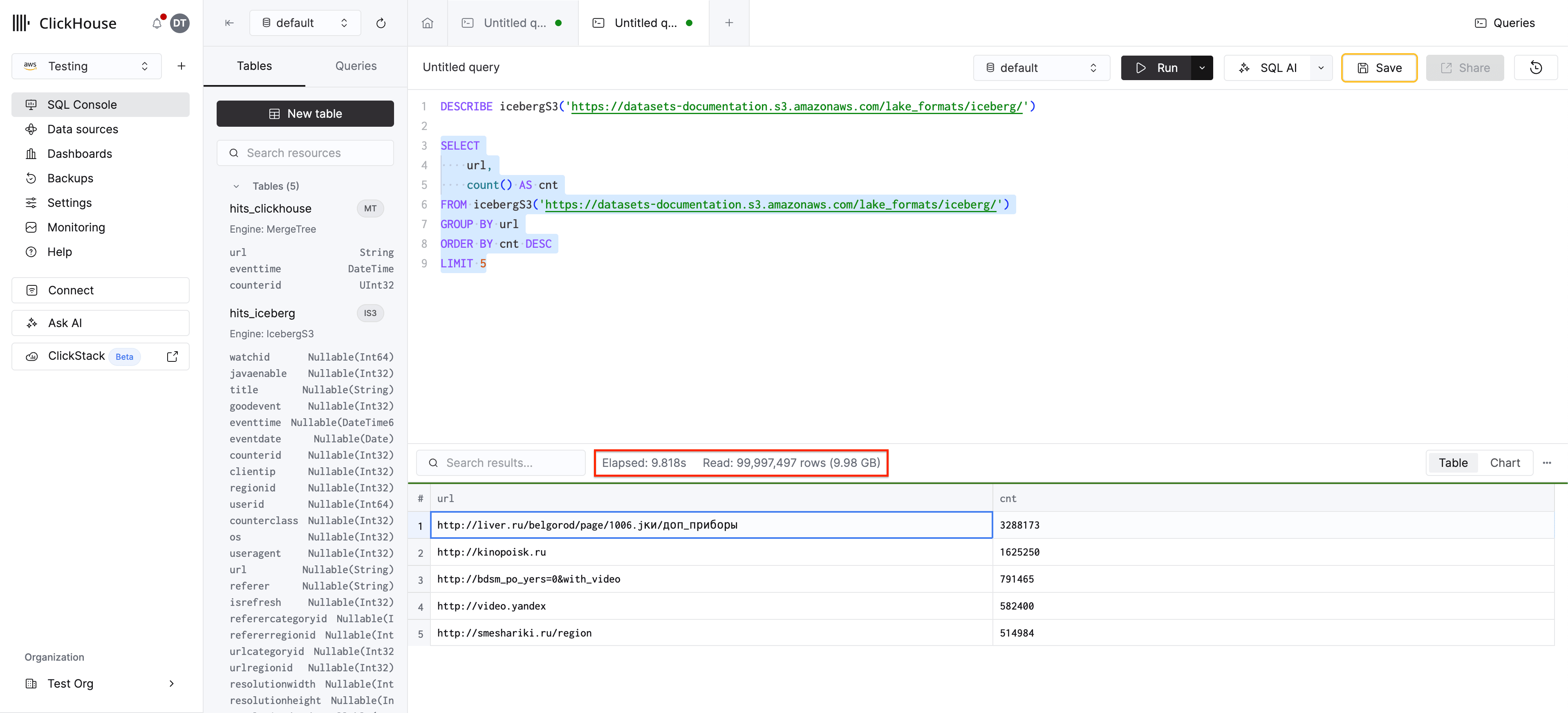
ClickHouse reads the Iceberg metadata directly from S3 and infers the schema automatically. The same approach works for deltaLake(), hudi(), and paimon().
Learn more: Querying open table formats directly covers all four formats, cluster variants for distributed reads, and storage backend options (S3, Azure, HDFS, local).
Create a persistent table engine
When you don’t use a catalog but will query the same path repeatedly, create a table using the Iceberg table engine so you don’t need to pass the path every time. The data stays in S3 — no data is duplicated:
CREATE TABLE hits_iceberg
    ENGINE = IcebergS3('https://datasets-documentation.s3.amazonaws.com/lake_formats/iceberg/')
Now query it like any ClickHouse table:
SELECT
    url,
    count() AS cnt
FROM hits_iceberg
GROUP BY url
ORDER BY cnt DESC
LIMIT 5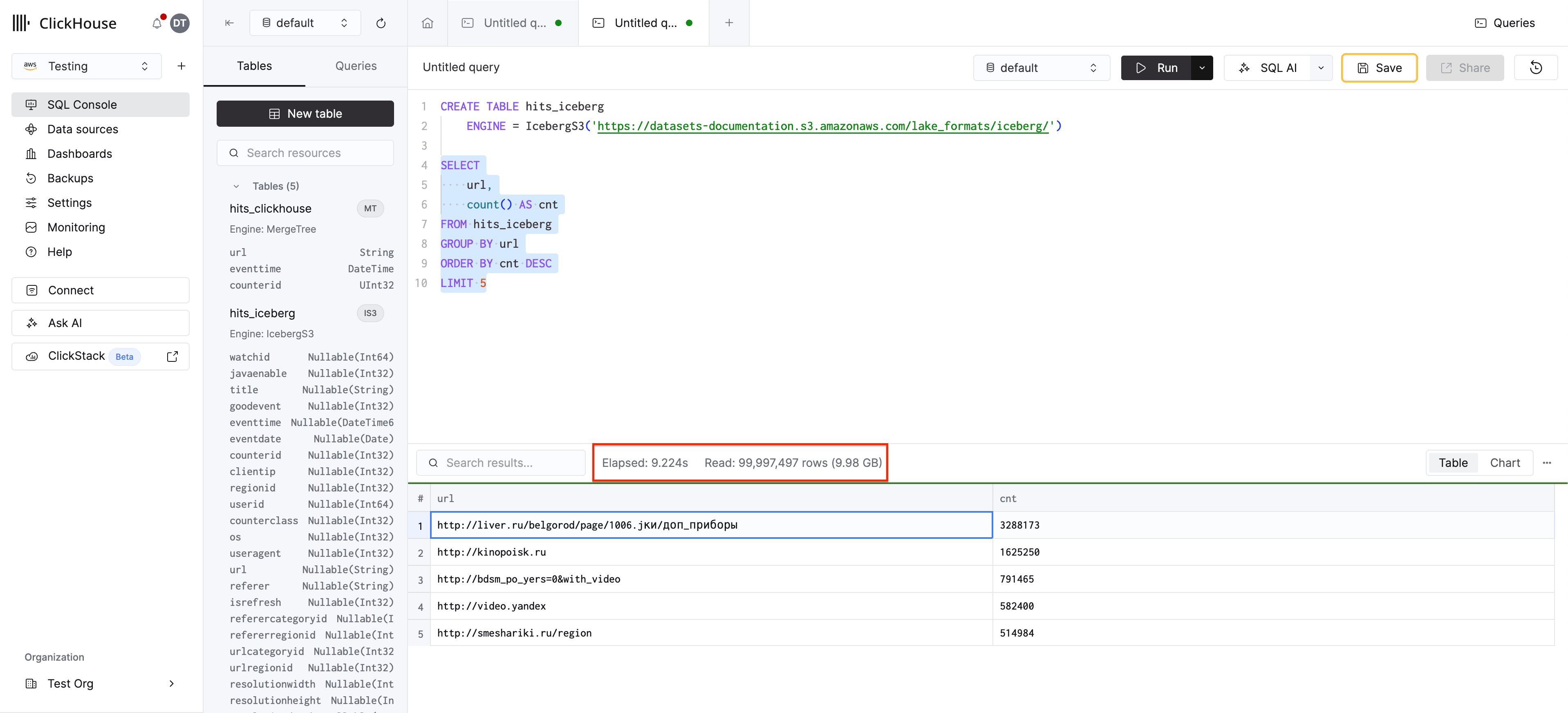
The table engine supports data caching, metadata caching, schema evolution, and time travel. See the Querying directly guide for details on table engine features and the support matrix for a full feature comparison.
Connect to a catalog
If your organization uses a data catalog, this is the integration path we recommend. Catalogs centralize table metadata and discovery — instead of managing a table definition for every storage path, connect once with the DataLakeCatalog database engine. Every table in the catalog appears as a ClickHouse table, including tables added upstream after you create the connection.
Here’s an example connecting to AWS Glue:
CREATE DATABASE my_lake
ENGINE = DataLakeCatalog
SETTINGS
    catalog_type = 'glue',
    region = '<your-region>',
    aws_access_key_id = '<your-access-key>',
    aws_secret_access_key = '<your-secret-key>'
Each catalog type requires its own connection settings — see the Catalogs guides for the full list of supported catalogs and their configuration options.
Browse tables and query:
SHOW TABLES FROM my_lake;SELECT count(*) FROM my_lake.`<database>.<table>`Learn more: Connecting to a data catalog walks through a full Unity Catalog setup with Delta and Iceberg examples.
Issue a query
Regardless of which method you used above — table function, table engine, or DataLakeCatalog — the same ClickHouse SQL works across all of them. In production with a catalog, query through the DataLakeCatalog database; the other examples remain useful for quick tests and path-based access:
-- Table function
SELECT url, count() AS cnt
FROM icebergS3('https://datasets-documentation.s3.amazonaws.com/lake_formats/iceberg/')
GROUP BY url ORDER BY cnt DESC LIMIT 5

-- Table engine
SELECT url, count() AS cnt
FROM hits_iceberg
GROUP BY url ORDER BY cnt DESC LIMIT 5

-- Catalog
SELECT url, count() AS cnt
FROM my_lake.`<database>.<table>`
GROUP BY url ORDER BY cnt DESC LIMIT 5
The query syntax is identical — only the FROM clause changes. All ClickHouse SQL functions, joins, and aggregations work the same way regardless of the data source.
Load a subset into ClickHouse
Querying Iceberg directly is convenient, but performance is bounded by network throughput and the file layout. For analytical workloads, load data into a native MergeTree table.
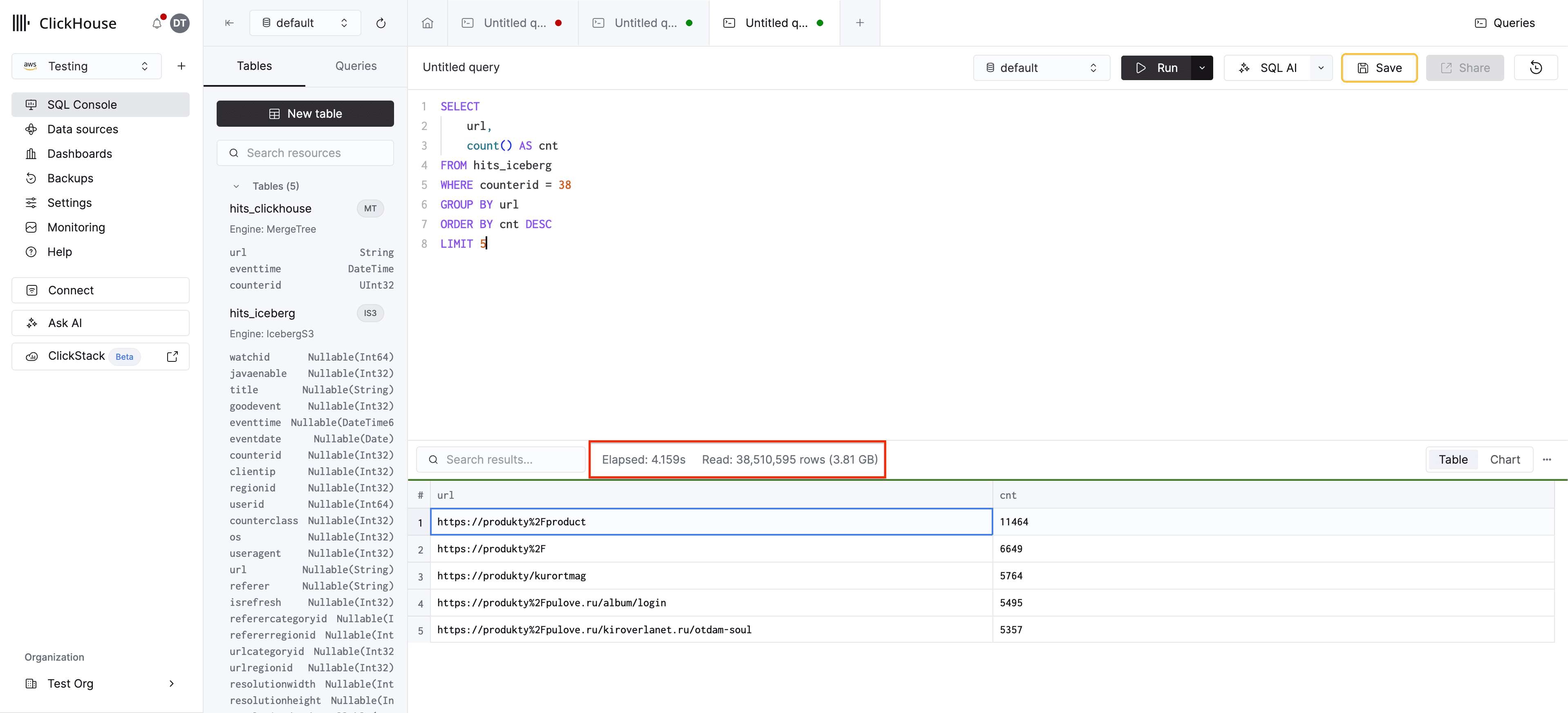
First, run a filtered query over the Iceberg table to get a baseline:
SELECT
    url,
    count() AS cnt
FROM hits_iceberg
WHERE counterid = 38
GROUP BY url
ORDER BY cnt DESC
LIMIT 5
This query scans the full dataset in S3 since Iceberg has no awareness of the counterid filter — expect it to take several seconds.
Now create a MergeTree table and load the data:
CREATE TABLE hits_clickhouse
(
    url String,
    eventtime DateTime,
    counterid UInt32
)
ENGINE = MergeTree()
ORDER BY (counterid, eventtime);
INSERT INTO hits_clickhouse
SELECT url, eventtime, counterid
FROM hits_icebergRe-run the same query against the MergeTree table:
SELECT
    url,
    count() AS cnt
FROM hits_clickhouse
WHERE counterid = 38
GROUP BY url
ORDER BY cnt DESC
LIMIT 5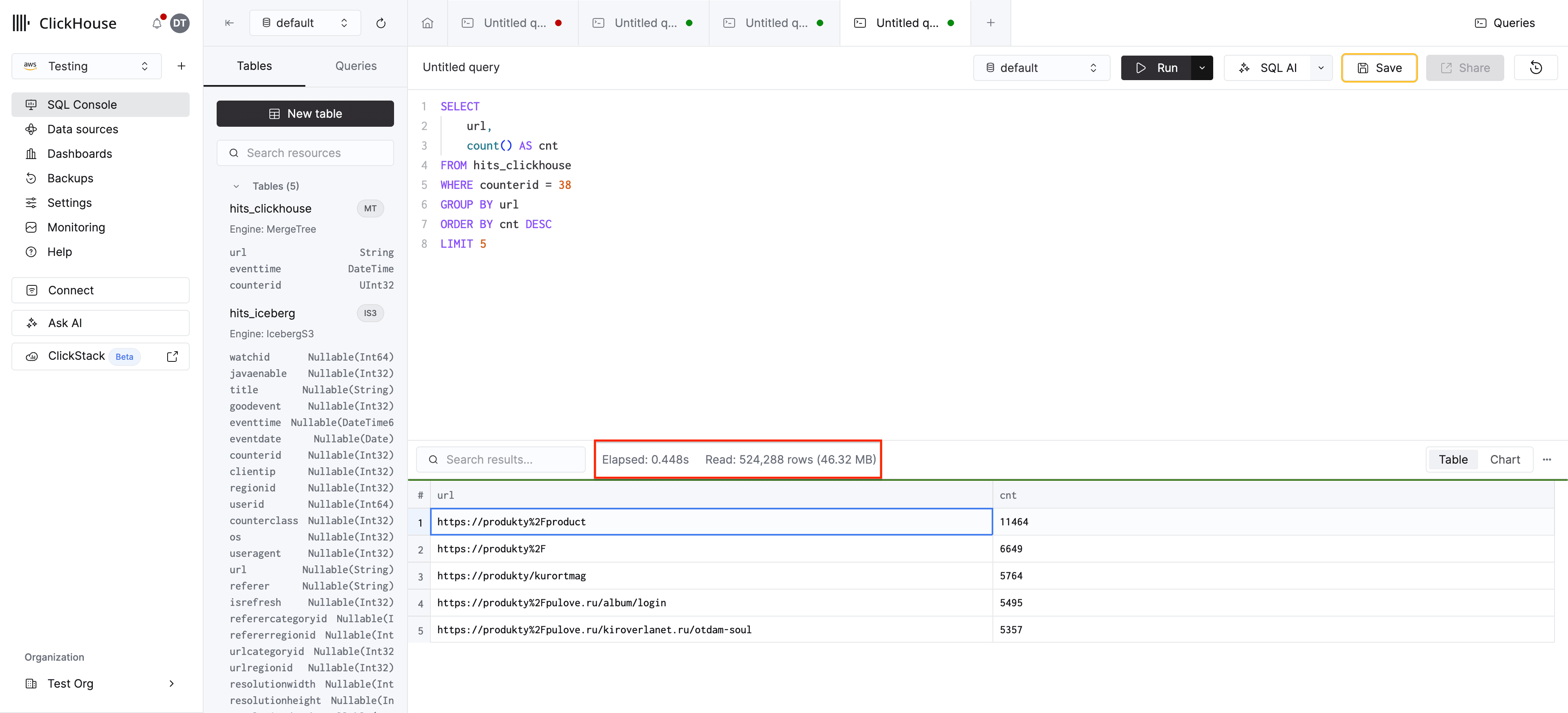
Because counterid is the first column in the ORDER BY key, ClickHouse’s sparse primary index skips directly to the relevant granules — only reading the rows for counterid = 38 instead of scanning all 100 million rows. The result is a dramatic speedup.
The accelerating analytics guide takes this further with LowCardinality types, full-text indices, and optimized ordering keys, demonstrating a ~40x improvement on a 283 million row dataset.
Learn more: Accelerating analytics with MergeTree covers schema optimization, full-text indexing, and a complete before/after performance comparison.
Write back to Iceberg
ClickHouse can also write data back to Iceberg tables, enabling reverse ETL workflows — publishing aggregated results or subsets for consumption by other tools (Spark, Trino, DuckDB, etc.).
Create an Iceberg table for output:
CREATE TABLE output_iceberg
(
    url String,
    cnt UInt64
)
ENGINE = IcebergS3('https://your-bucket.s3.amazonaws.com/output/', 'access_key', 'secret_key')
Write aggregated results:
SET allow_experimental_insert_into_iceberg = 1;

INSERT INTO output_iceberg
SELECT
    url,
    count() AS cnt
FROM hits_clickhouse
GROUP BY url
ORDER BY cnt DESC
The resulting Iceberg table is readable by any Iceberg-compatible engine.
Learn more: Writing data to open table formats covers writing raw data and aggregated results using the UK Price Paid dataset, including schema considerations when mapping ClickHouse types to Iceberg.
Next steps
Now that you’ve seen the full workflow, dive deeper into each area:
- Connecting to catalogs — Recommended for catalog-backed workloads; full Unity Catalog walkthrough with Delta and Iceberg
- Querying directly — All four formats, cluster variants, table engines, caching
- Accelerating analytics — Schema optimization, indexing, ~40x speedup demo
- Writing to data lakes — Raw writes, aggregated writes, type mapping
- Support matrix — Feature comparison across formats and storage backends
- Best practices — Access method selection, performance settings, and workload patterns