

 Set up docs MCP
DataStore is chDB’s pandas-compatible API that combines the familiar pandas DataFrame interface with the power of SQL query optimization and allows you to write pandas-style code while getting ClickHouse performance.
Key features
- Pandas Compatibility: 209 pandas DataFrame methods, 56
.strmethods, 42+.dtmethods - SQL Optimization: Operations automatically compile to optimized SQL queries
- Lazy Evaluation: Operations are deferred until results are needed
- 630+ API Methods: Comprehensive API surface for data manipulation
- ClickHouse Extensions: Additional accessors (
.arr,.json,.url,.ip,.geo) not available in pandas
Architecture
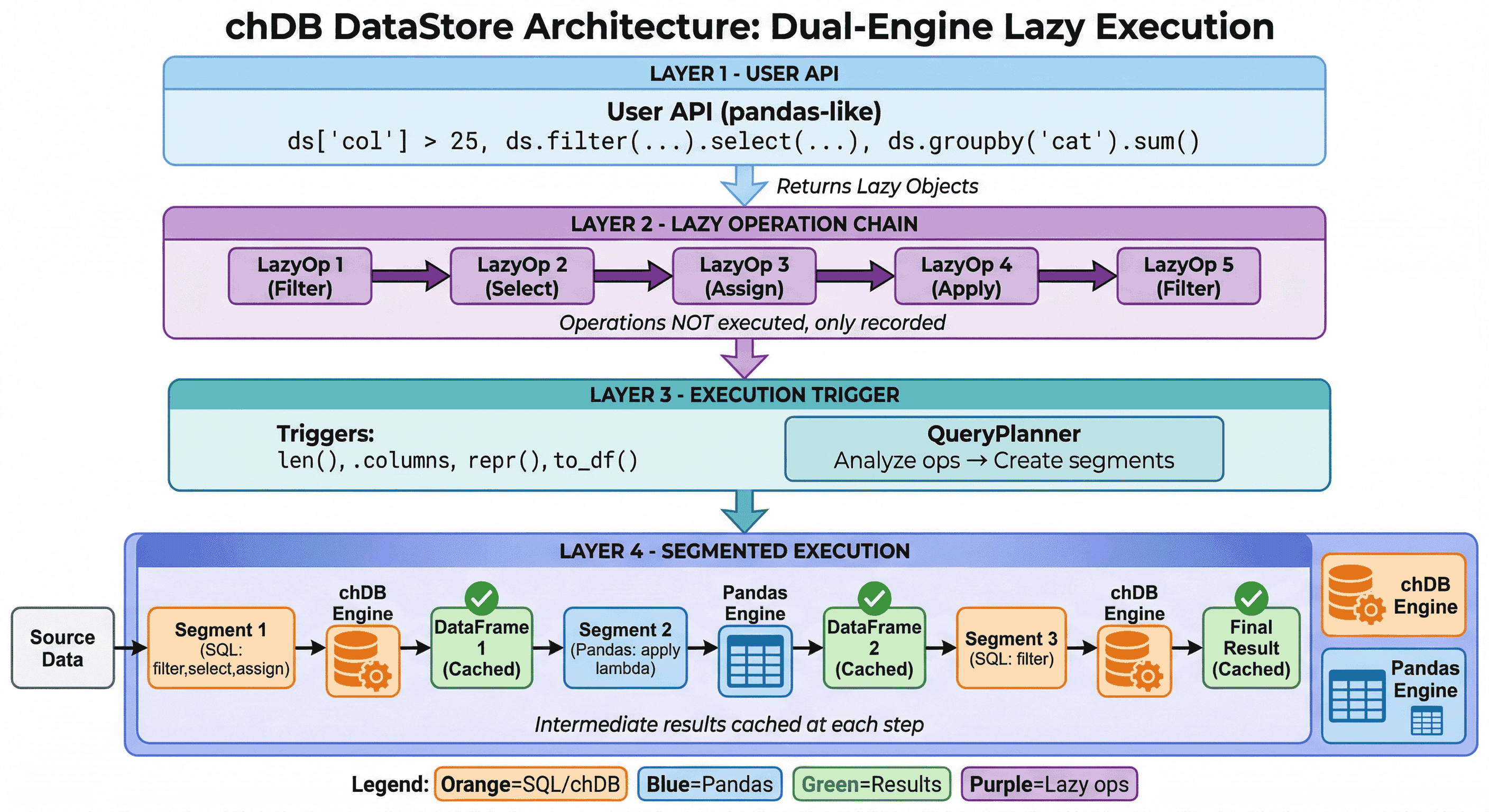
DataStore uses lazy evaluation with dual-engine execution:
- Lazy Operation Chain: Operations are recorded, not executed immediately
- Smart Engine Selection: QueryPlanner routes each segment to optimal engine (chDB for SQL, Pandas for complex ops)
- Intermediate Caching: Results cached at each step for fast iterative exploration
See Execution Model for details.
One-Line migration from Pandas
# Before (pandas)
import pandas as pd

df = pd.read_csv("data.csv")
result = df[df['age'] > 25].groupby('city')['salary'].mean()

# After (DataStore) - just change the import!
from chdb import datastore as pd
df = pd.read_csv("data.csv")
result = df[df['age'] > 25].groupby('city')['salary'].mean()
Your existing pandas code works unchanged, but now runs on the ClickHouse engine.
Performance comparison
DataStore delivers significant performance improvements over pandas, especially for aggregation and complex pipelines:
| Operation | Pandas | DataStore | Speedup |
|---|---|---|---|
| GroupBy count | 347ms | 17ms | 19.93x |
| Complex pipeline | 2,047ms | 380ms | 5.39x |
| Filter+Sort+Head | 1,537ms | 350ms | 4.40x |
| GroupBy agg | 406ms | 141ms | 2.88x |
Benchmark on 10M rows. See benchmark script and Performance Guide for details.
When to use DataStore
Use DataStore when:
- Working with large datasets (millions of rows)
- Performing aggregations and groupby operations
- Querying data from files, databases, or cloud storage
- Building complex data pipelines
- You want pandas API with better performance
Use raw SQL API when:
- You prefer writing SQL directly
- You need fine-grained control over query execution
- Working with ClickHouse-specific features not exposed in pandas API
Feature comparison
| Feature | Pandas | Polars | DuckDB | DataStore |
|---|---|---|---|---|
| Pandas API compatible | - | Partial | No | Full |
| Lazy evaluation | No | Yes | Yes | Yes |
| SQL query support | No | Yes | Yes | Yes |
| ClickHouse functions | No | No | No | Yes |
| String/DateTime accessors | Yes | Yes | No | Yes + extras |
| Array/JSON/URL/IP/Geo | No | Partial | No | Yes |
| Direct file queries | No | Yes | Yes | Yes |
| Cloud storage support | No | Limited | Yes | Yes |
API statistics
| Category | Count | Coverage |
|---|---|---|
| DataFrame methods | 209 | 100% of pandas |
| Series.str accessor | 56 | 100% of pandas |
| Series.dt accessor | 42+ | 100%+ (includes ClickHouse extras) |
| Series.arr accessor | 37 | ClickHouse-specific |
| Series.json accessor | 13 | ClickHouse-specific |
| Series.url accessor | 15 | ClickHouse-specific |
| Series.ip accessor | 9 | ClickHouse-specific |
| Series.geo accessor | 14 | ClickHouse-specific |
| Total API methods | 630+ | - |
Documentation navigation
Getting Started
- Quickstart - Installation and basic usage
- Migration from Pandas - Step-by-step migration guide
API reference
- Factory Methods - Creating DataStore from various sources
- Query Building - SQL-style query operations
- Pandas Compatibility - All 209 pandas-compatible methods
- Accessors - String, DateTime, Array, JSON, URL, IP, Geo accessors
- Aggregation - Aggregate and window functions
- I/O Operations - Reading and writing data
Advanced topics
- Execution Model - Lazy evaluation and caching
- Class Reference - Complete API reference
Configuration & debugging
- Configuration - All configuration options
- Performance Mode - SQL-first mode for maximum throughput
- Debugging - Explain, profiling, and logging
Pandas user guides
- Pandas Cookbook - Common patterns
- Key Differences - Important differences from pandas
- Performance Guide - Optimization tips
- SQL for Pandas Users - Understanding the SQL behind pandas operations
Quick example
from chdb import datastore as pd

# Read data from various sources
ds = pd.read_csv("sales.csv")
# or: ds = pd.DataStore.uri("s3://bucket/sales.parquet")
# or: ds = pd.DataStore.from_mysql("mysql://user:pass@host/db/table")

# Familiar pandas operations - automatically optimized to SQL
result = (ds
    .filter(ds['amount'] > 1000)           # WHERE amount > 1000
    .groupby('region')                      # GROUP BY region
    .agg({'amount': ['sum', 'mean']})       # SUM(amount), AVG(amount)
    .sort_values('sum', ascending=False)    # ORDER BY sum DESC
    .head(10)                               # LIMIT 10
)

# View the generated SQL
print(result.to_sql())

# Execute and get results
df = result.to_df()  # Returns pandas DataFrame
Next steps
- New to DataStore? Start with the Quickstart Guide
- Coming from pandas? Read the Migration Guide
- Want to learn more? Explore the API Reference